Testkube MCP Hosted Endpoint
The Testkube Control Plane provides a hosted MCP endpoint that allows you to connect directly to Testkube without running a local MCP server. This is the recommended approach for most users.
This is the easiest way to get started with the Testkube MCP Server - no local installation required!
Why Use the Hosted Endpoint?
- No local setup - No need to install the Testkube CLI or Docker
- Remote access - Connect to Testkube from any location without local setup
- Always available - The endpoint is always running and accessible
- Simplified deployment - No need to manage a local MCP server process
- Centralized configuration - Manage authentication and permissions through the Control Plane
- Team collaboration - Multiple users can connect to the same endpoint
- Automatic updates - Control Plane updates are handled automatically
- Consistent performance - Leverages the Control Plane's infrastructure
Prerequisites
- Access to a Testkube Environment - You need an active Testkube organization and environment
- API Token - A valid Testkube API token with appropriate permissions
- An AI tool that supports MCP with SSE transport - Such as Claude Desktop, Cursor, VS Code with GitHub Copilot, or custom MCP clients
Endpoint URL Structure
The hosted MCP endpoint follows this URL pattern:
https://api.testkube.io/organizations/{organization_id}/environments/{environment_id}/mcp
Replace:
{organization_id}with your Testkube organization ID (e.g.,tkcorg_076487a004a7f6fb){environment_id}with your environment ID (e.g.,tkcenv_d19e797ff2c1449b)
You can find your organization and environment IDs in the Testkube Dashboard URL or by running:
testkube get context
Configuration Example
To use the hosted endpoint with an AI tool that supports SSE (Server-Sent Events) transport:
{
  "mcpServers": {
    "testkube": {
      "url": "https://api.testkube.io/organizations/tkcorg_076487a004a7f6fb/environments/tkcenv_d19e797ff2c1449b/mcp",
      "transport": {
        "type": "sse"
      },
      "headers": {
        "Authorization": "Bearer YOUR_API_TOKEN_HERE"
      }
    }
  }
}
Replace:
tkcorg_076487a004a7f6fbwith your actual organization IDtkcenv_d19e797ff2c1449bwith your actual environment IDYOUR_API_TOKEN_HEREwith your Testkube API token
Obtaining an API Token
- Log in to your Testkube Dashboard
- Navigate to Organization Settings → API Tokens
- Create a new API token with appropriate permissions
- Copy the generated API token (you won't be able to see it again)
See API Token Management for more details.
Self-Hosted Deployments
For self-hosted Testkube instances, use your custom control plane URL:
{
  "mcpServers": {
    "testkube": {
      "url": "https://your-control-plane.example.com/organizations/{organization_id}/environments/{environment_id}/mcp",
      "transport": {
        "type": "sse"
      },
      "headers": {
        "Authorization": "Bearer YOUR_API_TOKEN_HERE"
      }
    }
  }
}
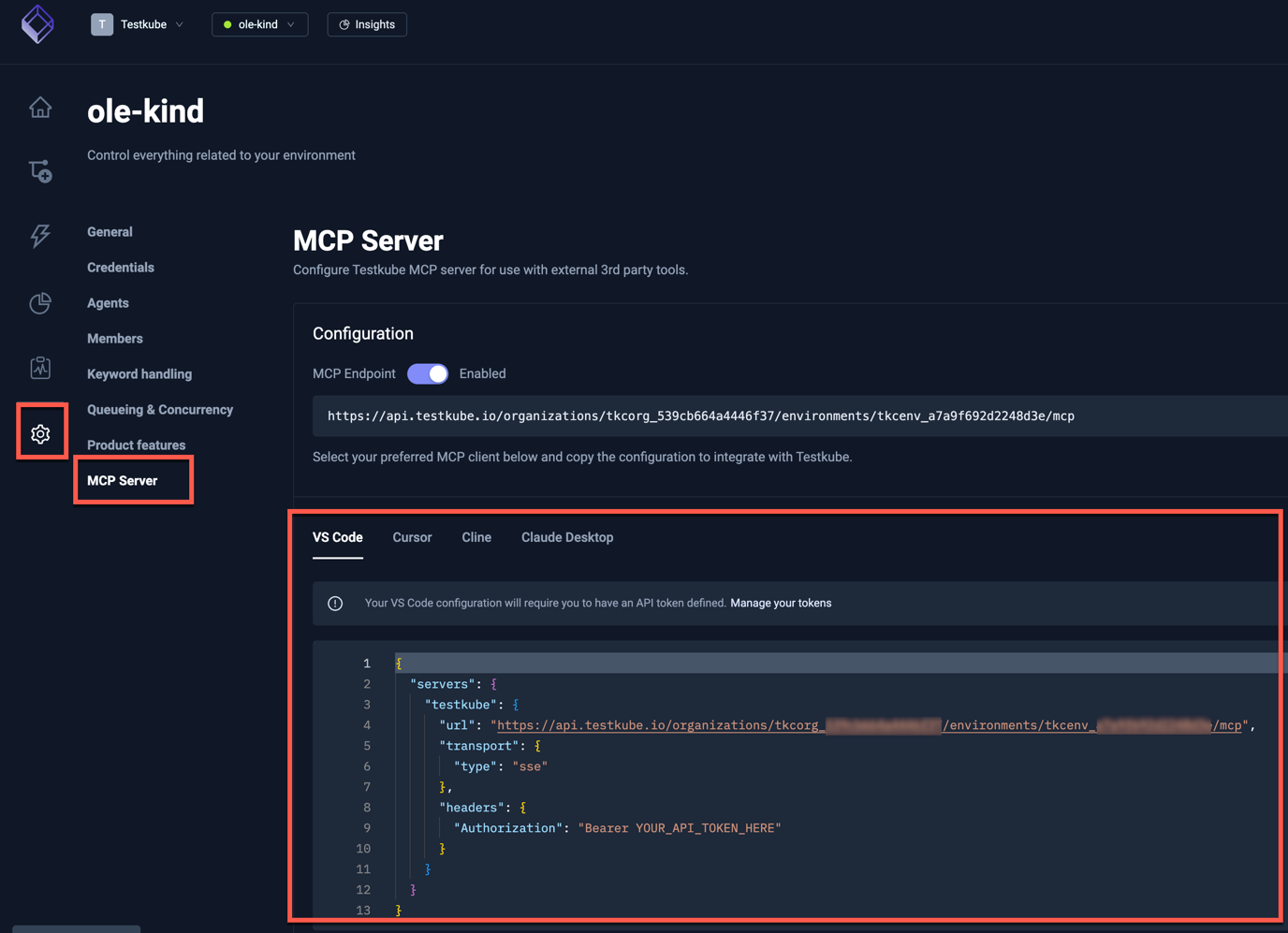
Hosted Endpoint in the Testkube Dashboard
The Testkube Dashboard provides convenient access to the hosted endpoint for your Testkube Environments together with configuration examples for common IDEs, simply navigate to the Environment Settings page and select the MCP Server option: